
配置文件

Windows操作系统配置文件

配置设置文件(INI)文件是windows操作系统中的一种特殊的ASCII文件,以ini为文件扩展名,作为它的主要文件配置文件标准。该文件也被称为初始化文件initialization file和概要文件profile。
应用程序可以拥有自己的配置文件,存储应用设置信息,也可以访问windows的基本系统配置文件win.ini中存储的配置信息

INI配置信息分为两部分

  • 节,节标题放在方括号中, [section]
  • 项,一个等式,key=value
    1
    2
    3
    4
    5
    6
    7
    ;注释

    ;节
    [section]

    ;参数(键=值)
    name=value

INI文件片段

1
2
3
4
[0x0419]
1100=Ошибка инициализации программы установки
1101=%s
1102=%1 Идет подготовка к запуску мастера %2, выполняющего установку программы. Ждите.

Windows 提供的API

1
2
3
4
5
6
7
8
9
10
11
12
13
14
15
16
DWORD GetPrivateProfileString(
LPCTSTR lpAppName, // If this parameter is NULL, the GetPrivateProfileString function copies all section names in the file to the supplied buffer.
LPCTSTR lpKeyName, // If this parameter is NULL, all key names in the section specified by the lpAppNameparameter are copied to the buffer specified by the lpReturnedString parameter.
LPCTSTR lpDefault, // If the lpKeyName key cannot be found in the initialization file, GetPrivateProfileString copies the default string to the lpReturnedString buffer.
LPTSTR lpReturnedString, // destination buffer
DWORD nSize, // size of destination buffer
LPCTSTR lpFileName // The name of the initialization file
);


UINT GetPrivateProfileInt(
LPCTSTR lpAppName, //节
LPCTSTR lpKeyName,//项
INT nDefault, //The default value to return if the key name cannot be found in the initialization file.
LPCTSTR lpFileName //INI文件名
);

Java配置文件

JDK提供了java.util.Properties类,用于处理简单的配置文件。Properties继承自Hashtable
相对于INI文件,Properties处理得配合文件格式非常简单

Properties的使用

  1. 非XML文件格式
    1
    2
    3
    4
    5
    6
    7
    8
    //通过指定的键搜索属性
    public String getProperty(String key)

    //功能同上,参数defaultValue提供了默认值
    public String getProperty(String key, String defaultValue)

    //最终调用Hashtable 的方法put
    public synchronized object setProperty (String key, String value)

Properties中的属性通过load)方法加载,该方法从输入流中读取键-值对,而store()
方法法则将Properties表中的属性列表写入输出流。使用输入流和输出流,Properties对象但可以保存在文件中,而且还可以保存在其他支持流的系统中,如Web服务器。

1
2
3
4
5
6
7
8
9
10
11
12
13
14
15
16
17
18
19
20
21
22
23
24
/**
* log4j.properties内容如下
* log4j.rootLogger=INFO, stdout
* log4j.appender.stdout=org.apache.log4j.ConsoleAppender
* log4j.appender.stdout.layout=org.apache.log4j.PatternLayout
* log4j.appender.stdout.layout.ConversionPattern=%d %p [%c] - %m%n
* log4j.appender.logfile=org.apache.log4j.FileAppender
* log4j.appender.logfile.File=target/spring.log
* log4j.appender.logfile.layout=org.apache.log4j.PatternLayout
* log4j.appender.logfile.layout.ConversionPattern=%d %p [%c] - %m%n
* @param args
* @throws IOException
*/
public static void main(String[] args) throws IOException {

Properties properties = new Properties();
//获取resources目录下的文件流
InputStream stream = MyConfiguration.class.getClassLoader().getResourceAsStream("log4j.properties");
//加载文件获取并获取配合信息
properties.load(stream);
String property = properties.getProperty("log4j.rootLogger");
System.out.println(property);
/*输出: INFO, stdout */
}

Java 1.5之后支持XML配置文件,Properties中的数据也可以以XML格式保存,对应的加载和写出方法是loadFromXML()和storeToXML()

storeToXML()

1
2
3
4
5
Properties props = new Properties();
props.setProperty("Length", "100");
props.setProperty("Width", "50")
FileOutputStream fos = new FileOutputStream("properties.xml");
props.storeToXML(fos, null);

loadFromXML()

1
2
3
4
5
6
7

Properties props = new Properties();
InputStream in = MyConfiguaration2.class.getClassLoader().getResourceAsStream("properties.xml");

props.loadFromXML(in)
String length = props.getProperty("Length");
System.out.println(length);

xml有指定格式

1
2
3
4
5
6
<?xml version="1.0" encoding="UTF-8" standalone="no"?>
<!DOCTYPE properties SYSTEM "http://java.sun.com/dtd/properties.dtd">
<properties>
<entry key="Width">50</entry>
<entry key="Length">100</entry>
</properties>

java.util.Properties提供的能力有限,其他配置信息读写方法,如Apache Jakarta Commons工具集提供的Commons Configuration

【说明】:上面的MyConfiguration都是自定义的类,并且这些配置文件都在resources文件夹下

Hadoop Configuration详解

Hadoop没有使用java.util.Properties管理配置文件,也没有使用Apache Jakarta
Commons Configuration 管理配置文件,而是使用了一套独有的配置文件管理系统,并提供自己的API,即使用org.apache.hadoop.conf.Configuration处理配置信息。

hadoop 配置文件格式

1
2
3
4
5
6
7
8
9
10
11
12
13
14
15
16
17
18
19
20
21
22
23
24
25
26
27
28
29
30
31
<?xml version="1.0" encoding="UTF-8"?>
<?xml-stylesheet type="text/xsl" href="configuration.xsl"?>
<!--
Licensed under the Apache License, Version 2.0 (the "License");
you may not use this file except in compliance with the License.
You may obtain a copy of the License at

http://www.apache.org/licenses/LICENSE-2.0

Unless required by applicable law or agreed to in writing, software
distributed under the License is distributed on an "AS IS" BASIS,
WITHOUT WARRANTIES OR CONDITIONS OF ANY KIND, either express or implied.
See the License for the specific language governing permissions and
limitations under the License. See accompanying LICENSE file.
-->

<!-- Put site-specific property overrides in this file. -->

<configuration>
<!-- 指定HDFS中NameNode的地址 -->
<property>
<name>fs.defaultFS</name>
<value>hdfs://master:9000</value>
</property>

<!-- 指定hadoop运行时产生文件的存储目录 -->
<property>
<name>hadoop.tmp.dir</name>
<value>/opt/module/hadoop-2.9.2/data</value>
</property>
</configuration>

Hadoop 配置文件参数说明

配置参数类型说明

  • 参数名 String
  • 参数值 boolean int long float,也可以是其他类型

参数说明

  • 根元素 configuration
  • configuration下的property元素
  • property下
    • name 参数名
    • value 参数值
    • description 参数描述
    • final 相当于java的final关键字,在资源合并时可以防止配置项被覆盖

合并资源

合并资源是是指将多个配置合并,产生一个配置文件,如core-site.xml和core-defualt.xml通过addResources()方法合并

1
2
3
4
5
6
7
Configuration conf = new Configuration();
//加载resources文件夹内容
ClassLoader classLoader = HadoopConfiguaration.class.getClassLoader
//添加合并资源
conf.addResource(Objects.requireNonNull(classLoader.getResourceAsSt("core-site.xml")));
conf.addResource(Objects.requireNonNull(classLoader.getResourceAsSt("core-default.xml")
System.out.println(conf.get("fs.defaultFS"));

【注意】如果第一个配置中存在final,则会以下出现警告,并且值不发生更改

1
2
3
2019-11-12 17:31:34,548 WARN [org.apache.hadoop.util.Shell] - Did not find winutils.exe: java.io.FileNotFoundException: java.io.FileNotFoundException: HADOOP_HOME and hadoop.home.dir are unset. -see https://wiki.apache.org/hadoop/WindowsProblems
2019-11-12 17:31:34,777 WARN [org.apache.hadoop.conf.Configuration] - java.io.BufferedInputStream@cac736f:an attempt to override final parameter: fs.defaultFS; Ignoring.
2019-11-12 17:31:34,777 WARN [org.apache.hadoop.conf.Configuration] - java.io.BufferedInputStream@1d7acb34:an attempt to override final parameter: fs.defaultFS; Ignoring.

测试用的core-default.xml文件

1
2
3
4
5
6
7
8
9
10
11
12
13
14
15
16
17
18
19
20
<?xml version="1.0" encoding="UTF-8"?>
<?xml-stylesheet type="text/xsl" href="configuration.xsl"?>

<configuration>
<!-- 指定HDFS中NameNode的地址 -->
<property>
<name>fs.defaultFS</name>
<value>hdfs://vmaster:8200</value>
</property>

<!-- 指定hadoop运行时产生文件的存储目录 -->
<property>
<name>hadoop.tmp.dir</name>
<value>/opt/module/hadoop-2.3.2/tmp</value>
</property>
<property>
<name>123</name>
<value>wer</value>
</property>
</configuration>

Configuation类的一般过程

  1. 构造Configuration对象
  2. 添加需要加载的资源 addResource()方法
  3. 然后通过set/get 方法访问/设置配置项

【说明】资源会在第一次使用时自动加载到对象中

Configuration类介绍

类图
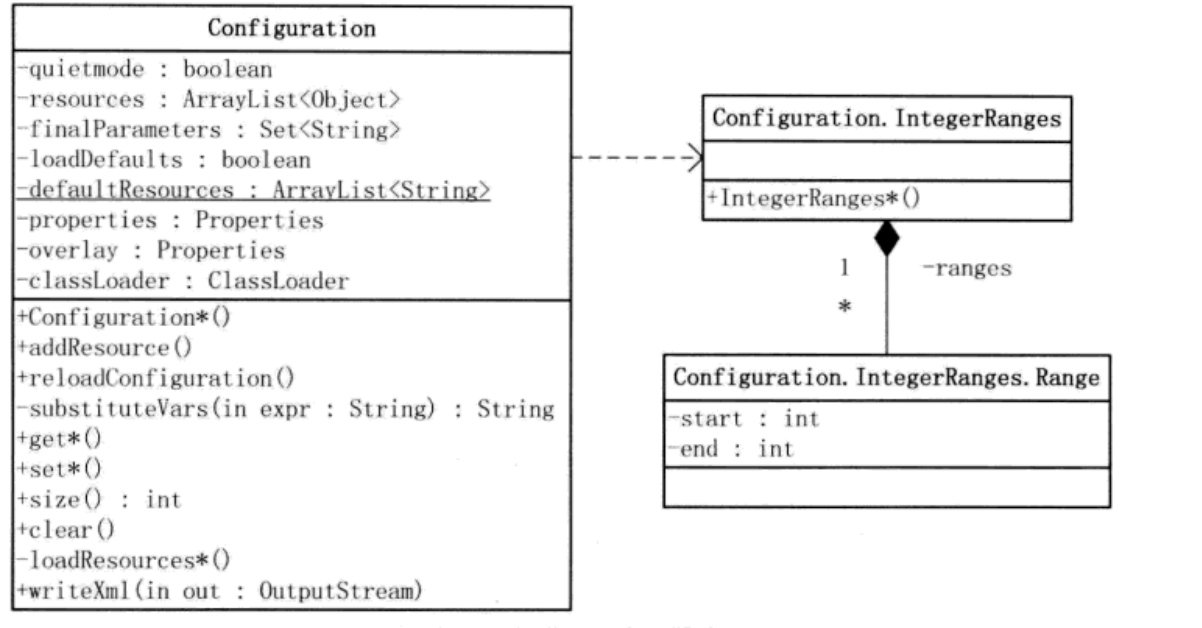
说明

类图中,Configuration有7个非静态成员

  • 布尔变量quietmode,用来设置加载配置的模式。如果quietmode为true (默认值),则在加载解析配置文件的过程中,不输出日志信息。quietmode只是-一个方便开发人员调试的变量。
  • 数组resources保存了所有通过addResource()方法添加Configuration对象的资源

Configuration.addResource()有如下4种形式:

1
2
3
4
public void addResource (InputStream in)  //已打开的输入流
public void addResource (Path file) //Hadoop文件路径
public void addResource (String name) //CLASSPATH 资源 String形式
public void addResource (URL url) //URL,统一资源定位符,如https://lyhcc.github.io

  • 布尔变量loadDefaults用于确定是否加载默认资源,这些默认资源保存在defaultResources
    中。注意,defaultResources 是个静态成员变量,通过方法addDefaultResource()可以添加系
    统的默认资源。在HDFS中,会把hdfs-default.xml和hdfs-site.xml作为默认资源,并通过addDefaultResource()保存在成员变量defaultResources中;在MapReduce中,默认资源是
    mapred-default.xml和mapred-site.xml。
    1
    2
    3
    4
    5
    6
    7
    //下面的代码来自hadoop-1.x 的org.apache.hadoop.hdfs.server.datanode.DataNode 
    static{
    Configuration . addDe faultResource ("hdfs-default . xml") ;
    Conf igurat ion. addDe faultResource ("hdfs-site. xml") ;
    }
    //在hadoop2.x以后这代码被移到了Configuration类里面
    //hadoop-2.8.4中的1809行
  • properties 存放Hadoop配置文件解析后的键-值对,为java.util.Properties类型
  • finalParameters 类型是Set, 用来保存所有在配置文件中已经被声明为final的键-值对的键
  • overlay用于记录通过set()方式改变的配置项。也就是说,出现在overlay中的键-值对是应用设置的,而不是通过对配置资源解析得到的,为java.util.Properties类型
  • Configuration 是一一个类加载器变量,可以通过它来加载指定类,也可以通过它加载相关的资源。

    上面提到addResource()可以通过字符串方式加载CLASSPATH资源,它其实通过Configuration中的getResource()将字符串转换成URL资源

    1
    2
    3
    public URL getResource (String name){
    return classLoader.getResource(name) ;
    }

    2.8.4版本的Configuration类的1188行

Configuration类的过程

构造Configuration对象

资源加载

添加资源到Configuration对象的方法有两种

  • 对象的addResource()方法
  • 类的静态addDefaultResource()方法(设置了loadDefaults标志)

    添加的资源并不会立即被加载,只是通过reloadConfiguration()方法清空properties和finalParameters。相关代码如下:

1
2
3
4
5
6
7
8
9
10
11
12
13
14
15
 //以URL资源为例
public void addResource(URL url) {
this.addResourceObject(new Configuration.Resource(url));
}
//添加资源
private synchronized void addResourceObject(Configuration.Resource resource){
this.resources.add(resource);
this.restrictSystemProps |= resource.isParserRestricted();
this.reloadConfiguration();
}
//资源重新加载触发函数
public synchronized void reloadConfiguration() {
this.properties = null;
this.finalParameters.clear();
}

以上是类的成员方法addResource()方法的调用。

静态方法dDefaultResource()也可以清空Configuration对象中的数据(非静态成员),只不过是通过需要通过REGISTRY作为媒介进行。能够调用是因为REGISTRY记录了系统所有的Configuration对象
REGISTRY的定义以及为其添加参数的过程

1
2
3
4
5
6
7
8
private static final WeakHashMap<Configuration, Object> REGISTRY = new WeakHashMap();

public Configuration(boolean loadDefaults) {
...
synchronized(Configuration.class) {
REGISTRY.put(this, (Object)null);
}
}

成员变量properties中的数据只在被调用的时候才会被加载进来。在getProps方法中,properties为空时,会触发loadResources()执行

1
2
3
4
5
6
7
8
9
10
11
12
13
14
15
16
17
18
19
20
21
22
23
24
protected synchronized Properties getProps() {
if (this.properties == null) {
this.properties = new Properties();
Map<String, String[]> backup = new ConcurrentHashMap(this.updatingResource);
this.loadResources(this.properties, this.resources, this.quietmode);
...
}

return this.properties;
}
//加载默认资源
private void loadResources(Properties properties, ArrayList<Configuration.Resource> resources, boolean quiet) {
if (this.loadDefaults) {
Iterator i$ = defaultResources.iterator();

while(i$.hasNext()) {
String resource = (String)i$.next();
this.loadResource(properties, new Configuration.Resource(resource, false), quiet);
}

if (this.getResource("hadoop-site.xml") != null) {
this.loadResource(properties, new Configuration.Resource("hadoop-site.xml", false), quiet);
}
}

hadoop配置文件解析

hadoop 的配置文件都是XML文件,JAXP(JAVA API for XML processing)是一种稳定的、可靠的XML处理API,支持两种XML处理方法

两种解析的区别

  1. SAX 提供了一种流式的、事件驱动的XML处理方式
    • 缺点:编写处理逻辑比较复杂
    • 优势:适合处理大的XML文件
  2. DOM 的工作方式是:
    • 首先一次性将XML文档加入内存
    • 然后在内存创建一个“树形结构”,也就是对象模型
    • 然后使用对象提供的接口访问文档,进而操作文档

Configurable接口

Configurable是一个很简单的接口,位于org.apache.hadoop.conf包中

类图
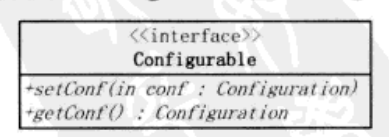
hadoop 代码中存在大量实现了该接口的类,可以通过setConf方法设置配置参数
简化创建和setConf的两个步骤
java反射机制实现,利用org.apache.hadoop.util.ReflectionUtils的newInstance方法

1
public static <T> T newInstance(Class<T> theClass, Configuration conf)

该方法调用了ReflectionUtils中的setConf方法

1
2
3
4
5
6
7
8
9
10
public static void setConf(Object theObject, Configuration conf) {
if (conf != null) {
if (theObject instanceof Configurable) {
((Configurable)theObject).setConf(conf);
}

setJobConf(theObject, conf);
}

}

Comments

Your browser is out-of-date!

Update your browser to view this website correctly. Update my browser now

×